
Catch-up DM 🕓💬
💡 Worth knowing: this feature requires a subscription to the Pro plan or above.
What is Catch-up DM?
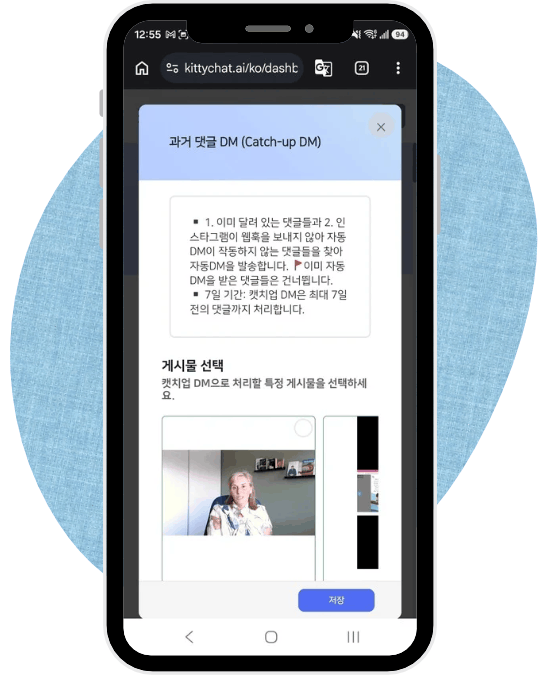
Catch-up DM goes back through comments that are already there and sends them the Auto DM.
Where an ordinary Auto DM handles comments as they arrive, Catch-up DM handles the ones that have already been left.
When to use it 🎯
- 📝 Comments had already piled up before you set the Auto DMThe post got its reaction first, and the automation came afterwards.
- 🚧 An Instagram error or restriction stopped the Auto DM from firingWhen Instagram does not notify us about a comment, the Auto DM never goes out — this picks those up again.
How to use it 🔄
- Set up an ordinary Auto DM first. Catch-up DM does not take a new message of its own. It reuses the Auto DM and auto comment reply you already set up.
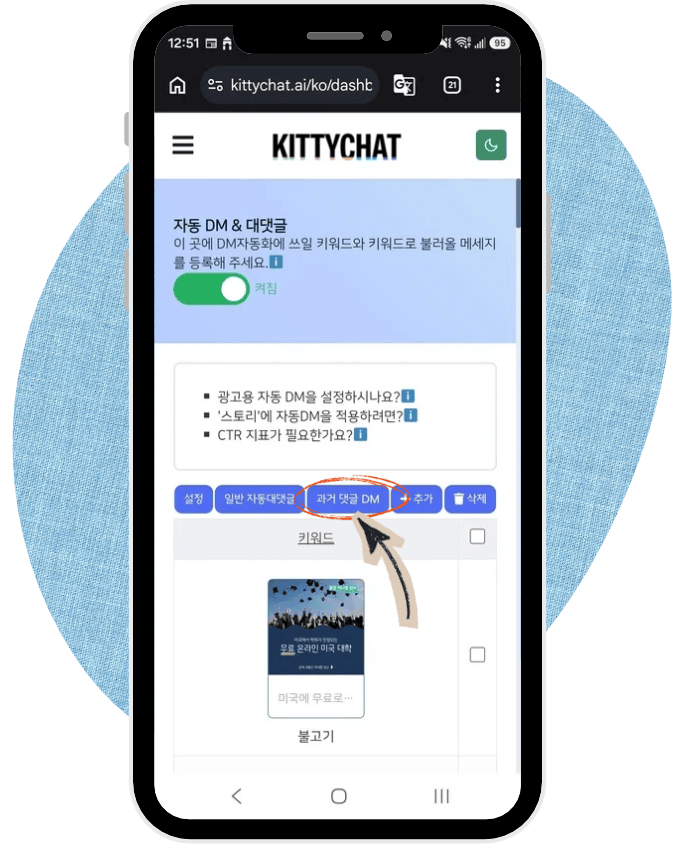
- On the Auto DM & comment page, press the Catch-up DM button.
- Select the posts to process. You can run it on one post at a time.
- Choose how many days back to go, and start. → Messages go out one after another, following the delays you set for the Auto DM and the auto comment replies.
The 7-day window ⚠️
Only comments left within the last 7 days can be processed.
⏳ Instagram's policy blocks an Auto DM to anything older than that.
So if you notice that your Auto DM has not been firing, it is worth running this sooner rather than later.
Nobody gets the message twice ✅
Comments that already received an Auto DM are skipped. You can run Catch-up DM on the same post more than once without anyone getting a duplicate.
It follows your safety settings ⏱️
Catch-up DM obeys the same delay and per-hour limit you set for your Auto DMs and auto comment replies. Nothing goes out in one burst, so even a large backlog is gentle on the account.
For those settings, see Staying safe when sending Auto DMs in bulk.